cull▌
jq for HTML.
Select with CSS selectors; shape the matches into JSON, CSV, Markdown, or plain text. One small static binary, built for pipes.
$ curl -s https://news.ycombinator.com | cull '.athing' -j '{rank: .rank | num, title: .titleline a, url: .titleline a @href}'
{"rank":1,"title":"…","url":"https://…"}
{"rank":2,"title":"…","url":"https://…"}
…
pup and htmlq proved that HTML belongs in shell pipelines — but they stop at printing raw HTML or bare text. cull goes where the data actually needs to go:
-j shaped JSON
A tiny jq-style template turns each
match into a clean JSON object (NDJSON, or --array). No other
selector CLI does this.
--table
HTML tables straight to CSV or NDJSON —
colspan/rowspan expanded, Wikipedia-style multi-row
headers merged.
--md
Page (or any selection) to readable Markdown: headings, links, lists, code, tables. Ideal for feeding pages to an LLM.
URLs as input
cull h1 -t https://…
fetches for you; relative links resolve against the page URL automatically.
Any encoding
Shift_JIS, KOI8-R, windows-1251 …
BOM, header, and <meta charset> honored, browser-style.
grep ergonomics
-c, -l,
-1, exit codes, multiple files & globs, clean SIGPIPE.
Feels like the tools you know.
Install
brew install rashida-thorne/cull/cull
curl -fsSL https://raw.githubusercontent.com/rashida-thorne/cull/main/scripts/install.sh | sh
scoop bucket add cull https://github.com/rashida-thorne/scoop-cull scoop install cull
nix run github:rashida-thorne/cull
docker run --rm -i ghcr.io/rashida-thorne/cull '.title' -t < page.html
cargo binstall cull
cargo install cull
Prebuilt binaries (Linux x86_64/arm64 fully static, macOS, Windows) on the
releases page.
Shell completions: cull --completions zsh · man page: cull --man.
Demo
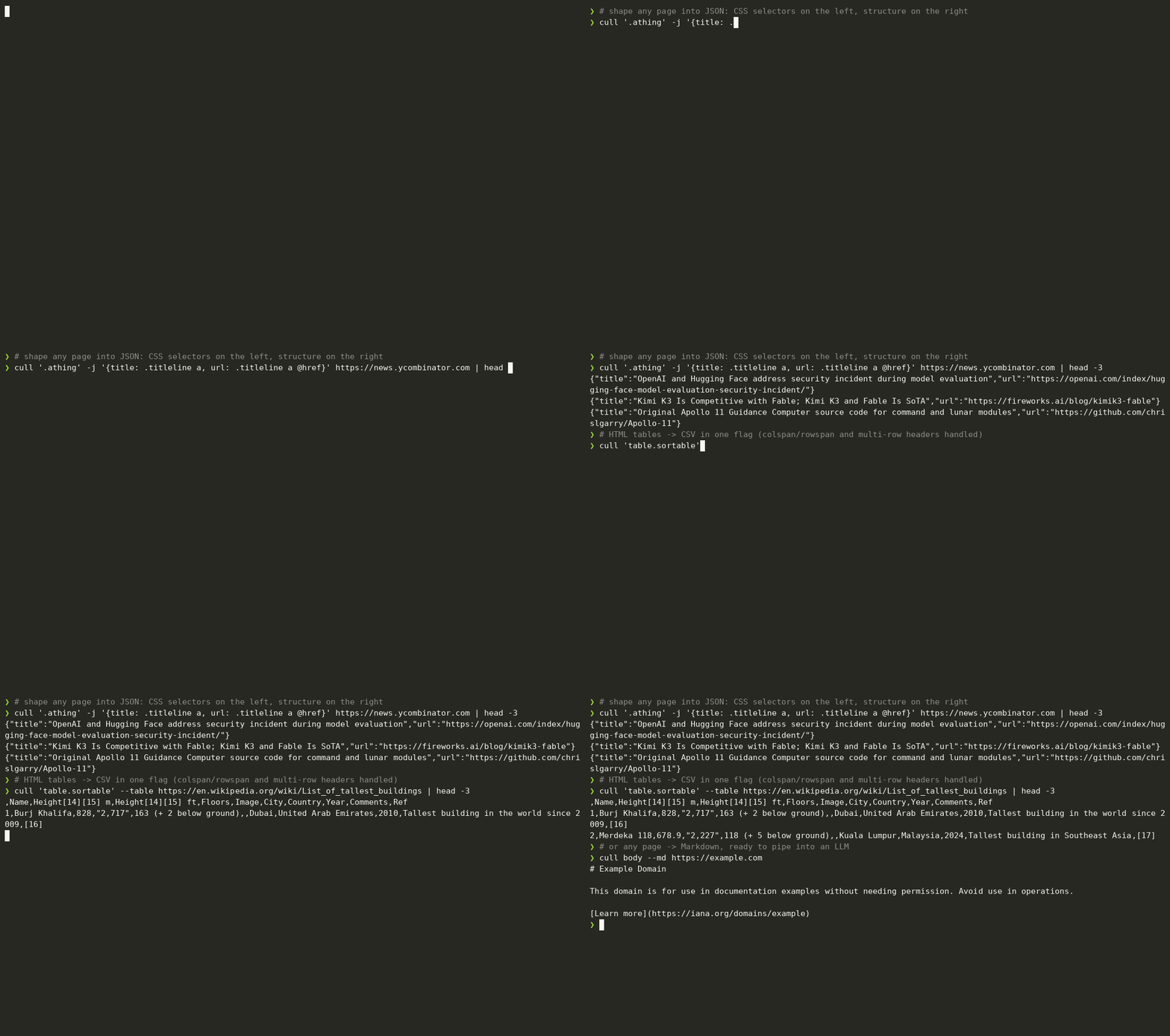
Show me
# Scrape a Wikipedia table into DuckDB-ready CSV
$ cull --table 'https://en.wikipedia.org/wiki/List_of_ISO_639_language_codes' > codes.csv
# Structured NDJSON from any listing page — missing values become null, rows stay rectangular
$ cull '.post' -j '{title: h2, url: a @href, score: .pts | num, tags: [.tag]}' blog.html
{"title":"Hello, world","url":"/posts/hello","score":128,"tags":["rust","intro"]}
# Strip the boilerplate, feed the article to an LLM
$ cull article --md -r 'nav, footer, script, style' "$URL" | llm "summarize this"
# All links on a page, absolutized
$ cull a -a href https://example.com
# grep across snapshots: which pages leak the generator tag?
$ cull 'meta[name=generator]' -l snapshots/*.html
snapshots/blog.html
More live-verified recipes in the cookbook. Coming from pup or htmlq? Side-by-side migration tables, flag for flag. There are also guides to HTML → Markdown conversion (whole pages, selected regions, LLM pipelines) and HTML table → CSV extraction (colspan/rowspan, stacked headers, sqlite pipelines), and RSS/XML → JSON parsing (feeds, Atom, sitemaps, namespaces).
vs. pup and htmlq
| pup | htmlq | cull | |
|---|---|---|---|
| CSS selectors → HTML / text / attr | ✓ | ✓ | ✓ |
:has(), :is(), :where() | error | panic | ✓ |
| Shaped JSON (jq-style templates) | — | — | ✓ |
| Tables → CSV / NDJSON | — | — | ✓ |
| Page → Markdown | — | — | ✓ |
| Fetch URLs directly | — | — | ✓ |
| Non-UTF-8 pages decoded correctly | — | — | ✓ |
| Multiple inputs / globs | — | — | ✓ |
| XML: RSS/Atom feeds, sitemaps, SVG | mangled | mangled | ✓ auto-detected |
| Interactive selector TUI (live preview) | — | — | ✓ -I |
Remove nodes first (-r) | — | ✓ | ✓ |
| Colorized / pretty HTML output | ✓ | — | ✓ |
| Pretty-print that doesn't change rendering | adds spaces | drops spaces | ✓ faithful |
Whole-doc output keeps <!DOCTYPE> | dropped | dropped | ✓ |
| Actively maintained | — | — | ✓ |
Also 1.2–1.6× faster on typical pages, with a reproducible benchmark script.